
We launched an "Ask Amazon Q" button in AWS Console's Unified Search that achieved 100% GA rollout on December 17th, 2025, successfully satisfying an AWS leadership goal. This integration created a seamless bridge between traditional search and conversational AI, enabling customers to transition from keyword searches to natural language assistance without losing context.
UX/UI Design | December 2025
Ingress to Amazon Q from Unified Search
Case Study
My Role
UX Design, User Research, Product Strategy, Wireframing, Prototyping
Tools
Figma, FigJam, UserTesting.com, AI Coding assistants
Timeframe
4 Months
The Outcome
Metrics That Prove It Worked
User Satisfaction: 100% Positive Ratings
- 77% rated "very useful," 23% rated "useful" in pre-launch usability testing
- 9% increase in Overall CSAT during IA rollout
- 77% expressed high likelihood to use Amazon Q for work tasks
"I think it's very useful, especially because it even lists all the steps to go through so that way you have no choice than to go like understand what you're doing" - Participant 5
Behavioral Change: 2X Increase in Natural Language Queries
- Shift from 99% navigational searches to more conversational interactions
- 258,725 natural language queries by January 2026
- Natural language queries (3+ words) doubled during rollout
Adoption: 34,017 Button Clicks
- 28,726 unique users engaged by December 2025
- 343M+ button shows to users
- CTR stabilized at 0.009-0.017% across rollout phases
The Problem We Solved
90% of AWS customers use at least 10 services, creating constant context switching and cognitive overload. They had to manually navigate between consoles, analyze disparate search results across 9 categories, and piece together documentation that lacked contextual guidance. Previous attempts to integrate AI (Q Summary IA launch in June 2025) failed with NPS -37.
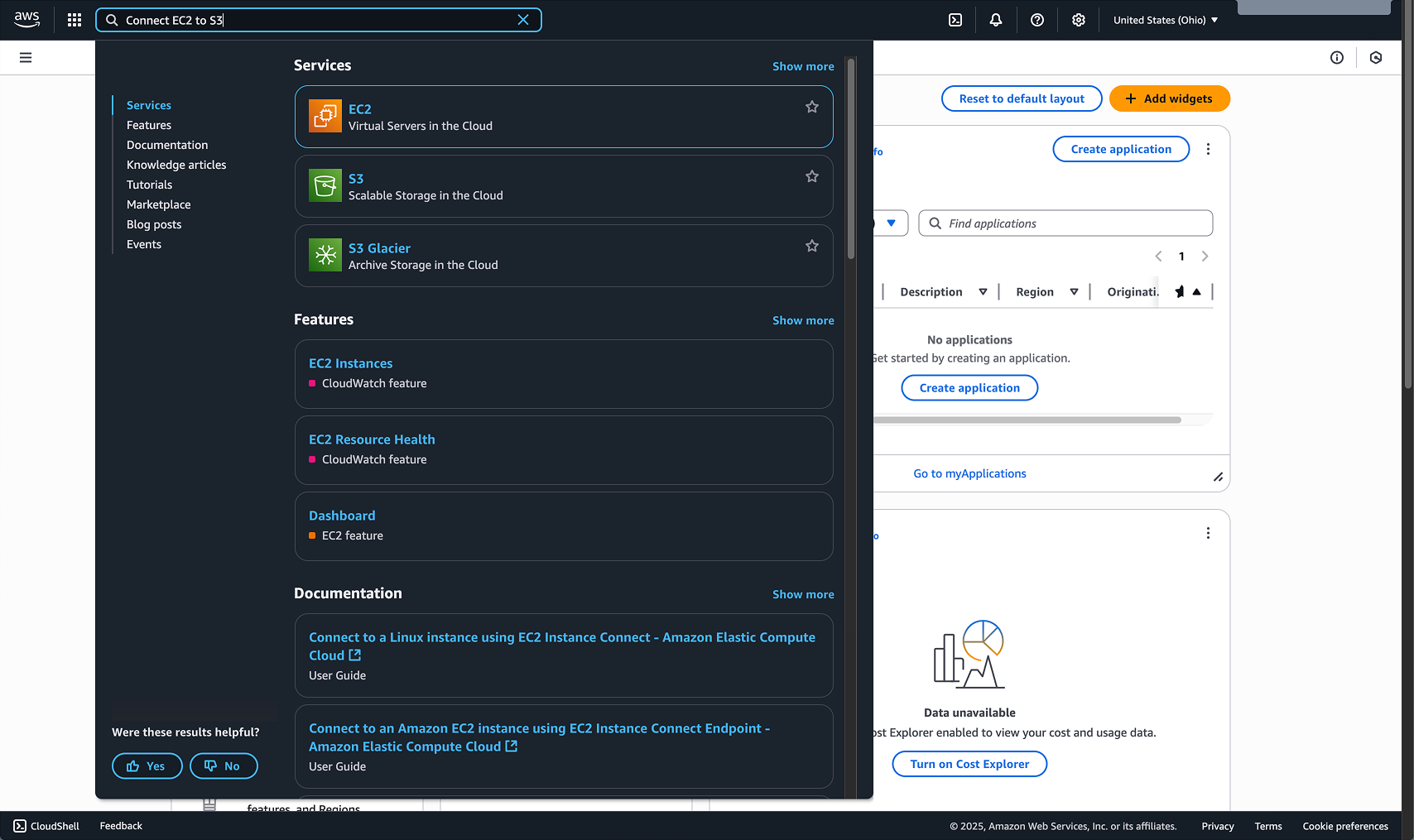
Before - Users scrolling through 8 search categories with no AI assistance
The Design Solution
We introduced a persistent "Ask Amazon Q" button in the search input field that progressively reveals itself through a four-state interaction pattern.
Critically, this design preserved users' existing learned success path: pressing Enter still navigates to the top search result (the familiar workflow), while clicking the new button opens the AI chat panel—two distinct paths that coexist without user disruption while educating users on natural language capabilities available in search.
Critically, this design preserved users' existing learned success path: pressing Enter still navigates to the top search result (the familiar workflow), while clicking the new button opens the AI chat panel—two distinct paths that coexist without user disruption while educating users on natural language capabilities available in search.
The Interaction Flow
Step 1: Empty State
The search bar displays "Search or ask anything" placeholder text with a subtle Amazon Q icon integrated into the input field. The icon signals AI capability without demanding attention, maintaining the familiar search experience customers expect.
The search bar displays "Search or ask anything" placeholder text with a subtle Amazon Q icon integrated into the input field. The icon signals AI capability without demanding attention, maintaining the familiar search experience customers expect.
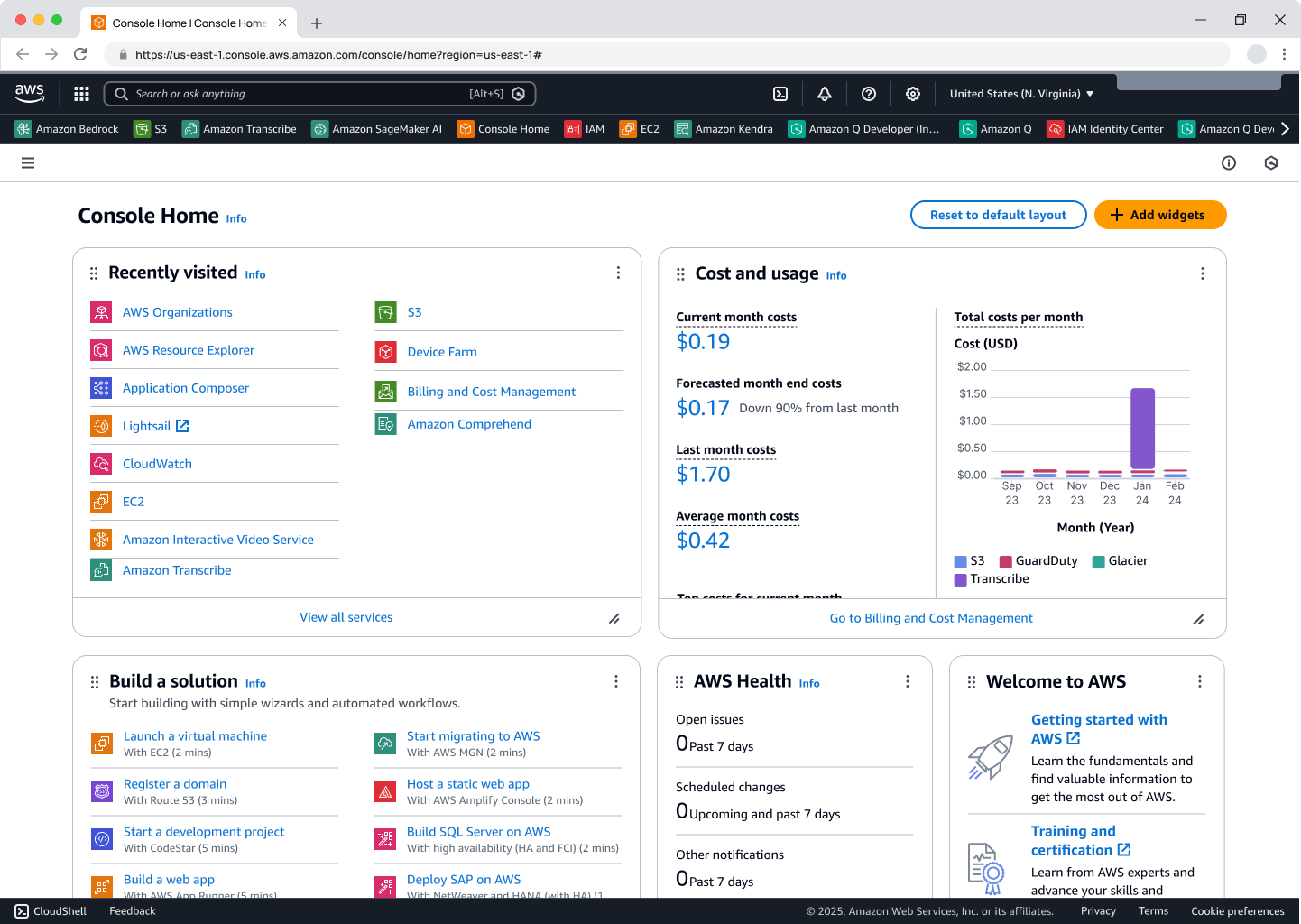
Step 1: Search empty state with Amazon Q icon
Step 2: Hover Discovery
When users hover over the Amazon Q icon, it expands into an "Ask Amazon Q" button, providing visual feedback that AI assistance is available. The button remains inactive (disabled state) until a query is entered, preventing accidental clicks and educating users about the feature's purpose.
When users hover over the Amazon Q icon, it expands into an "Ask Amazon Q" button, providing visual feedback that AI assistance is available. The button remains inactive (disabled state) until a query is entered, preventing accidental clicks and educating users about the feature's purpose.
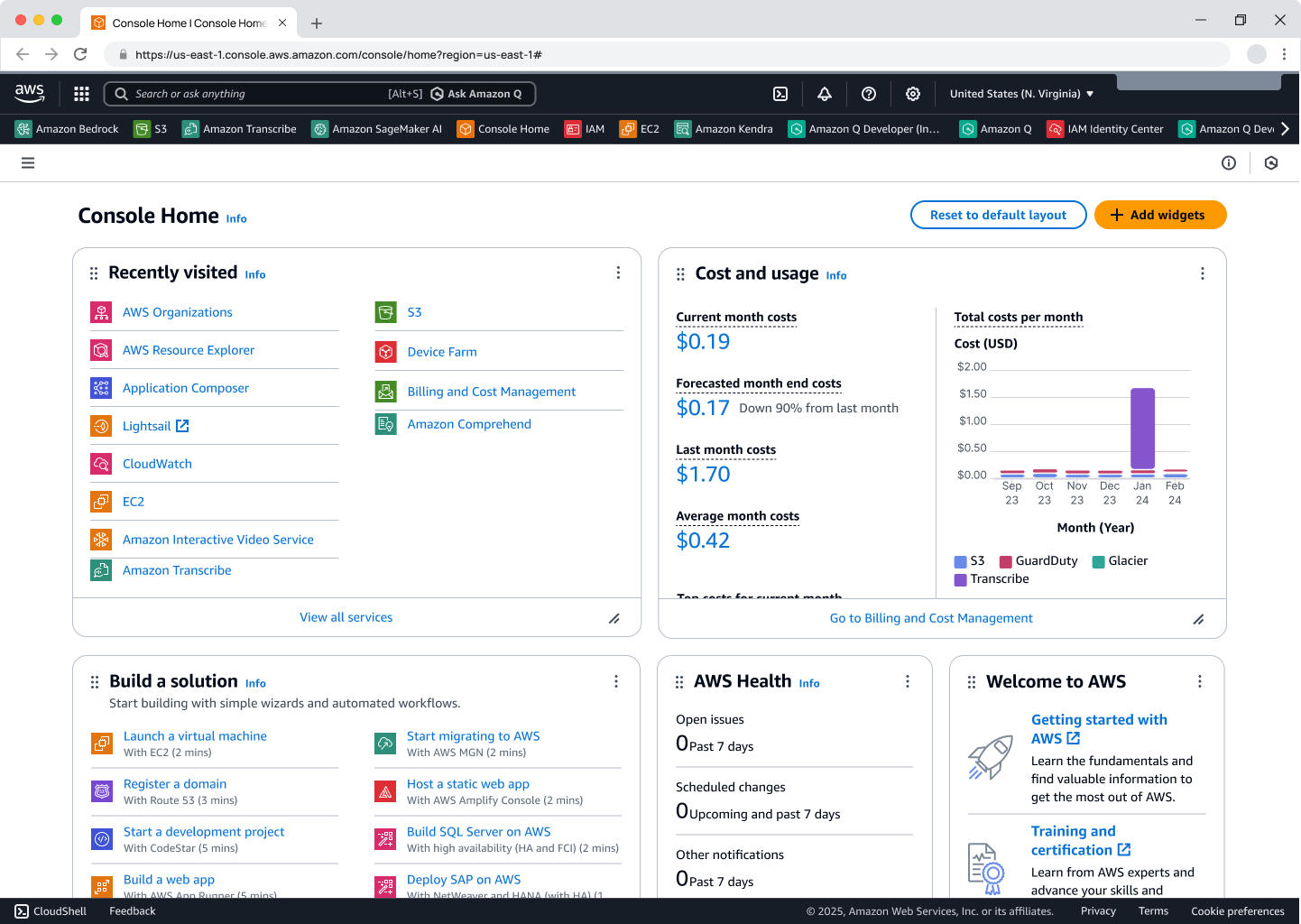
Step 2: Hover state of Amazon Q icon expands to button (inactive until query entered)
Step 3: Active Engagement
After entering a search query like "Connect EC2 to S3," the search overlay displays traditional results across multiple categories (Services, Features, Documentation) while the "Ask Amazon Q" button becomes active and clickable.
Users can now choose their path: press Enter to follow the familiar navigation to the top search result shown in the panel (outlined in blue), or click the button to engage AI assistance. This dual presentation respects existing muscle memory while introducing new capability.
After entering a search query like "Connect EC2 to S3," the search overlay displays traditional results across multiple categories (Services, Features, Documentation) while the "Ask Amazon Q" button becomes active and clickable.
Users can now choose their path: press Enter to follow the familiar navigation to the top search result shown in the panel (outlined in blue), or click the button to engage AI assistance. This dual presentation respects existing muscle memory while introducing new capability.
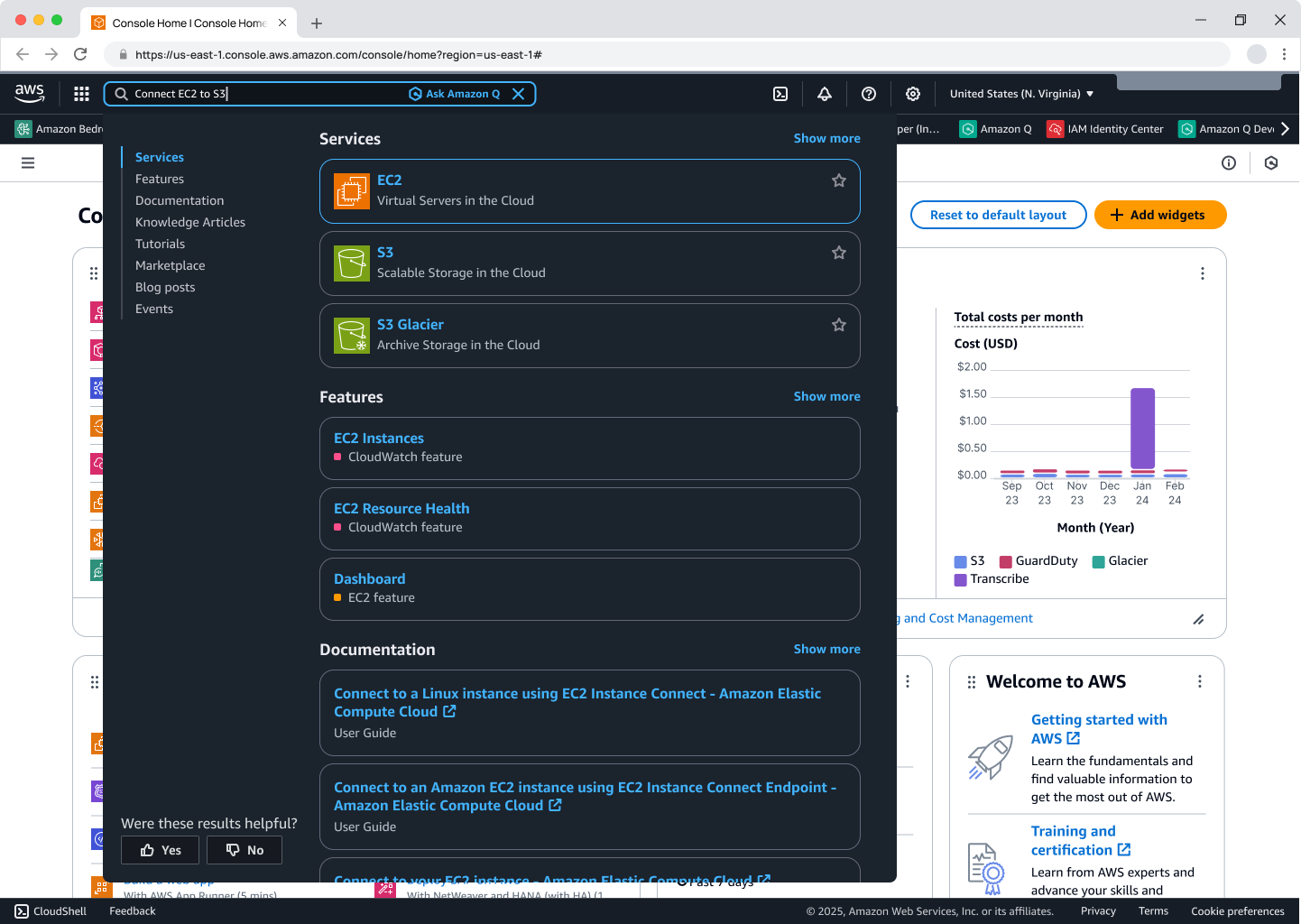
Step 3: Upon search query entry, button expands and changes to active/clickable state
Step 4: Contextual AI Assistance
Clicking the button closes the search overlay and opens Amazon Q's side panel, preserving the user's query and console page context.
If the search query matches an existing workflow Q has an artifact panel for (like "Connect EC2 to S3"), the artifact is displayed as a guided workflow with step-by-step instructions, resource selection dropdowns, and progress indicators—transforming a simple search into an intelligent, action-oriented experience.
For queries without workflow matches, Q provides conversational answers with relevant documentation, code snippets, and contextual guidance.
Clicking the button closes the search overlay and opens Amazon Q's side panel, preserving the user's query and console page context.
If the search query matches an existing workflow Q has an artifact panel for (like "Connect EC2 to S3"), the artifact is displayed as a guided workflow with step-by-step instructions, resource selection dropdowns, and progress indicators—transforming a simple search into an intelligent, action-oriented experience.
For queries without workflow matches, Q provides conversational answers with relevant documentation, code snippets, and contextual guidance.
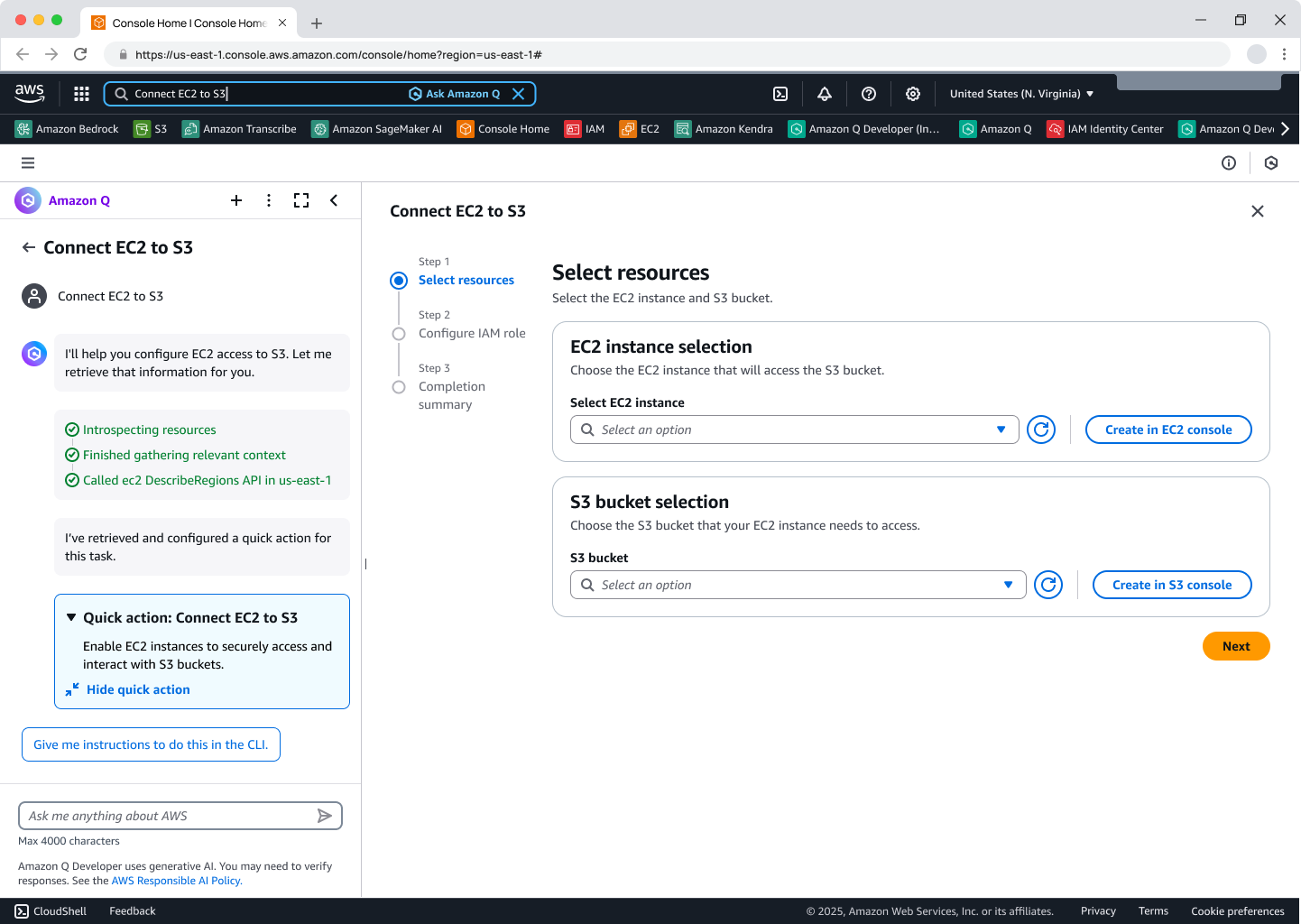
Step 4: Button clicked, Amazon Q panel opens, answers user's query and kicks off agent workflow when applicable
Note: The Q panel content and agent workflow represent separate design work beyond this case study's scope.
Design Principles
This progressive disclosure pattern achieves multiple objectives:
- Explicit user control: Button requires intentional action vs. automatic AI responses
- Context preservation: Query and console state maintained during transition
- User education: Hover and disabled states teach customers when/how to use AI
- Dual success paths: Familiar keyword search coexists with new conversational AI, enabling gradual adoption
- Security validation: Explicit click enables API deny list checks before execution
- Controlled rollout: Button interaction provides clear metrics for monitoring adoption
Why an explicit button?
It provided user education about natural language capabilities, ensured we didn't disrupt current behavior while adding functionality and educating users on natural language query patterns, enabled security validation through API deny lists, allowed controlled rollout monitoring, preserved existing user workflows, and learned from the previous failed auto generated summary IA launch that achieved NPS -37.
It provided user education about natural language capabilities, ensured we didn't disrupt current behavior while adding functionality and educating users on natural language query patterns, enabled security validation through API deny lists, allowed controlled rollout monitoring, preserved existing user workflows, and learned from the previous failed auto generated summary IA launch that achieved NPS -37.
Previous "Q Summary" Feature That Didn't Work
In June 2025, AWS launched "Generative answers in Unified Search" (aka "Q Summary") to Internal Availability. The feature automatically provided AI-generated answers directly within the search dropdown panel, allowing customers to ask questions in natural language and receive answers from Amazon Q Developer that combined content from multiple sources.
The Goal: Eliminate the need for customers to navigate to multiple links by providing direct answers within the search interface, increasing efficiency and reducing cognitive load.
The Reality: The IA launch was paused due to negative internal feedback (NPS -37) and limited usage data mainly due to:
- Answer render time could take 30+ seconds
- Couldn’t move the conversation context from Search into Q
- No individual resource details or mutative workflows
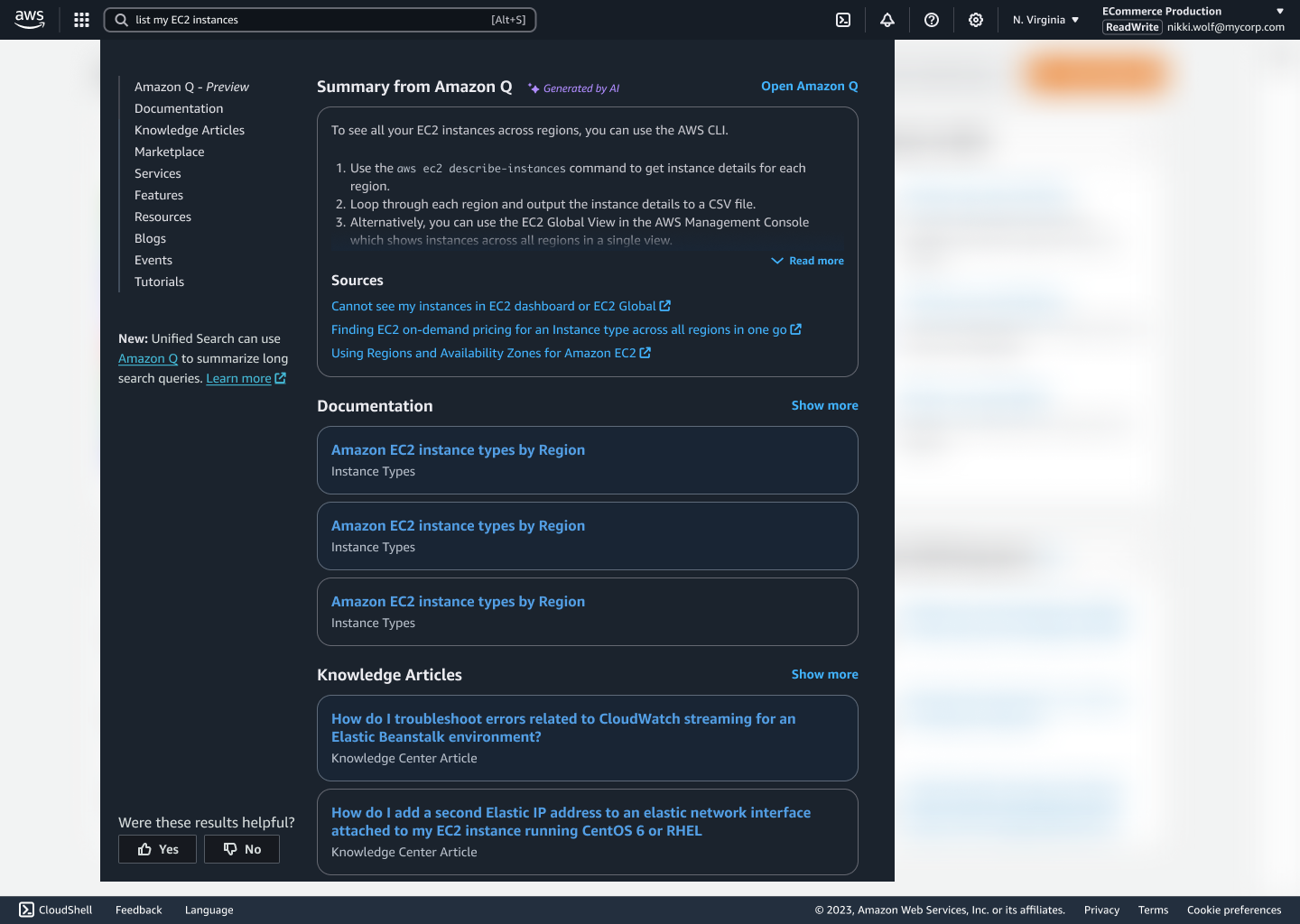
Amazon Q Summary in Search dropdown
What Failed
- Automatic AI insertion without user control created distrust
- Lack of query context preservation disrupted user workflows
- No security validation framework raised permission concerns
- Insufficient user education about when/how to use AI assistance
What We Changed
- Explicit user control: Button requires intentional action vs. automatic AI responses
- Context preservation: Query and console state maintained during transition
- Security-first design: Comprehensive API deny list and approval workflows
- Phased education: Gradual rollout allowed user learning and feedback incorporation
- Clear value proposition: Focused on complex task assistance rather than basic navigation
This humility-driven redesign transformed a -37 NPS failure into 100% positive ratings.
What's Next: The Four-Phase Evolution
This "Ask Amazon Q" button is Phase 1 of a four-part evolution toward the Omnibox vision—a single input mechanism where customers express jobs and receive simplified experiences to complete them.
The Evolution Ahead:
The next phases will progressively reduce friction by introducing autocomplete intelligence that interprets intent automatically, integrating Q-generated summaries directly into full-page search results for a unified view, and ultimately creating a task-first interaction model that eliminates multi-console navigation entirely. The system will become adaptive, understanding user context and needs to enable efficient work across simple to complex tasks.
The Vision:
By the end of this evolution, AWS Console users won't navigate through multiple service consoles to complete jobs. They'll express intent once, and the system will understand context, provide guidance, and enable action—all from a single conversational interface. This button feature is the first step in that transformation.


